
Avail

a fintech SaaS platform built for freelancers to simplify finances
Money

The Project

Logo  Wordmark & Tagline

Helping freelancers understand what they can actually spend after taxes, expenses, and unpaid invoices.

Role

Product Designer

Tools

Figma, Illustrator

TIMELINE

4 Weeks

Deliverables

  • Research
  • UX Strategy
  • UI Design
  • Prototyping
  • Branding
Avail dashboard

Overview

Project Summary

Freelancers often struggle to understand their financial health despite having access to accounting tools.

Avail helps freelancers:

  • Track income
  • Estimate taxes
  • Manage invoices
  • Understand spendable income in real time

My Goal

Design a financial management tool that prioritizes clarity over accounting complexity.

Finances

The Problem

Freelancers know what they earn but not what they can spend

Many tools answer

How much money came in?

Few tools answer

How much money is actually available?

Pain Points

  • Irregular income
  • Tax uncertainty
  • Unpaid invoices
  • Financial anxiety
The Problem

Research

Understanding freelancer financial workflows

Methods

  1. Competetive analysis
    • Honeybook
    • Wave
    • Freshbooks
  2. User interviews
  3. Workflow mapping
Research

Competitive Analysis

Income Tracking

Time Tracking

Invoicing

Tax Estimation

Financial Clarity

Honeybook

Wave

Freshbooks

★★★☆☆

★☆☆☆☆

★★★★★

★☆☆☆☆

★★☆☆☆

★★★★☆

☆☆☆☆☆

★★★★★

★★☆☆☆

★★★☆☆

★★★★☆

★★★★★

★★★★★

★★☆☆☆

★★★☆☆

Honeybook

Income Tracking

Time Tracking

Invoicing

Tax Estimation

Financial Clarity

★★★☆☆

★☆☆☆☆

★★★★★

★☆☆☆☆

★★☆☆☆

Wave

Income Tracking

Time Tracking

Invoicing

Tax Estimation

Financial Clarity

★★★★☆

☆☆☆☆☆

★★★★★

★★☆☆☆

★★★☆☆

Freshbooks

Income Tracking

Time Tracking

Invoicing

Tax Estimation

Financial Clarity

★★★★☆

★★★★★

★★★★★

★★☆☆☆

★★★☆☆

Opportunity

Most competitors focus on bookkeeping. Avail focuses on decision-making.

User Interviews

View the questions and answers to the interview here.

Relevant Quotes from Participants

"I use FreshBooks for invoices and expenses and a spreadsheet for everything else. The information is there, but it's scattered across too many places to give me a clear picture."

"Looking at my bank balance doesn't really tell me anything. I need to know what I can safely spend without worrying about an unexpected tax bill later."

Workflow Mapping

Log Income IN SPREADSHEET

Estimate Taxes

Deduct Taxes & Monthly Expenses From Available funds in Spreadsheet

Review Available funds

Take Action

Research Insights

Key Findings

  • Income ≠ Available Income

    Users mentally subtract taxes and expenses every time they check their balance.

  • Tax Planning Creates Anxiety

    Most freelancers estimate taxes manually.

  • Invoices Are Disconnected

    Income tracking and invoicing often happen in separate tools.

  • Existing Tools Feel Overwhelming

    Many participants described finance software as: "Built for accountants, not freelancers."

Problem Statement

How Might We...

Help freelancers understand their true financial position without requiring accounting expertise?

Problem Statement Banner

Design Principles

Guiding Principles

  • Clarity First

    Financial information should be understandable at a glance.

  • Reduce Anxiety

    Surface the most important numbers.

  • Action Over Reporting

    Help users make decisions.

  • Simple, Not Simplistic

    Powerful workflows without overwhelming complexity.

Information Architecture

Top Navigation

Top menu

Alerts

Help

Profile

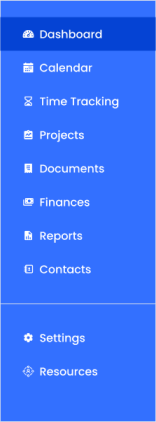
SIDE Navigation

Left Navigation Panel

Dashboard

Calendar

Time Tracking

Projects

Documents

Finances

Reports

Contacts

Settings

Resources

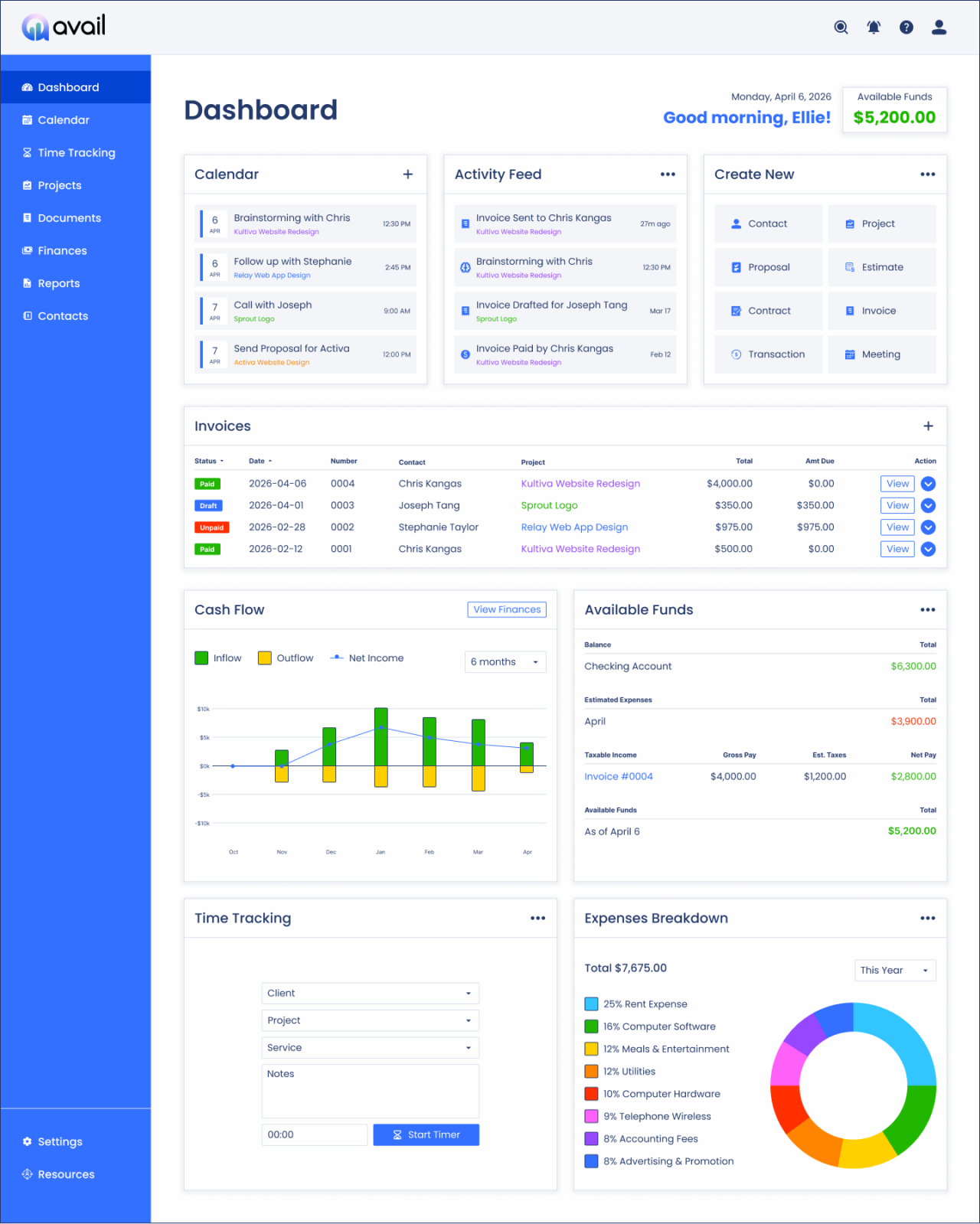
Dashboard Widgets

Dashboard screenshot

Calendar

Activity Feed

Create New

Invoices

Cash Flow

Available Funds

Time Tracking

Expenses Breakdown

Primary User Flow

Receive Payment

Client pays invoice and bank deposit arrives

Log Income

Record earnings: Client, Project, Amount, Date, Category

Estimate Taxes

Tax estimation happens automatically based on income

Update Available Income

Total Income - (Taxes & Expenses) = Available Income

Review Financial Health

View Dashboard: Available Funds, Cash Flow, Invoices

Take Action

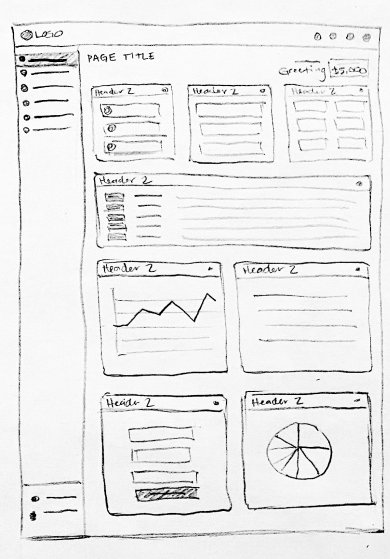
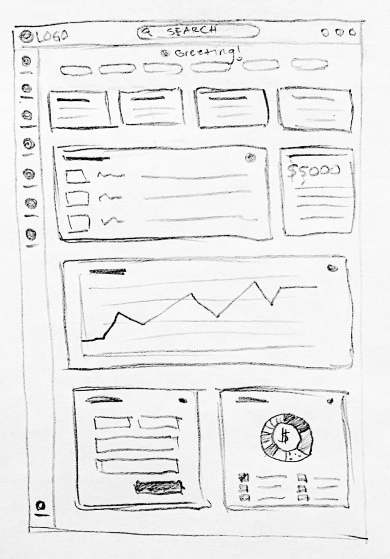
Sketches

Dashboard sketch 2Dashboard sketch 3Dashboard sketch 1

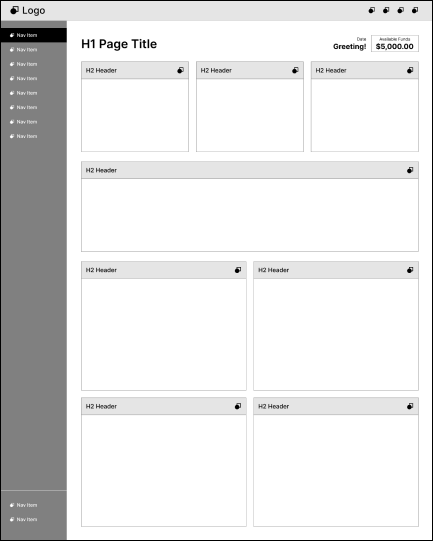
Wireframes

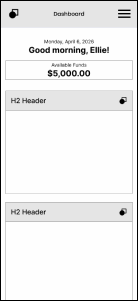
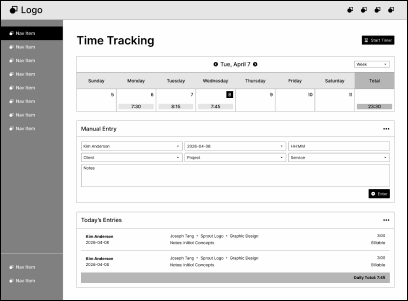
Dashboard wireframeMobile version of Projects wireframe
Mobile Dashboard Truncated wireframeCalendar wireframe
Mobile Dashboard  Menu wireframeTime Tracking wireframe

Usability Testing

Testing Findings & Iteration
Findings

  • Users confused available vs total income
  • Users missed tax breakdown details
  • Users wanted invoice status visibility

Design Changes

  • Improved labeling
  • Added visual breakdowns
  • Increased invoice visibility
Testing on a laptop

Before & After

Avail dashboard version 1Avail dashboard

Key Design Decisions

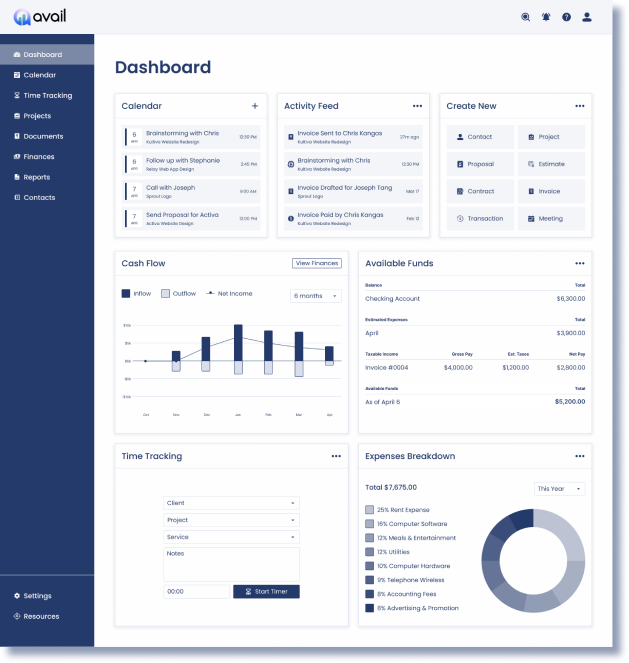
Making "Available Funds" the Hero

Available Funds

$5,200.00

Most tools prioritize

  • Revenue
  • Profit
  • Reports

Avail prioritizes

  • Available Funds
  • Expense Breakdown
  • Invoice Tracking
Available income widgetExpense breakdown

Dashboard

Avail dashboard

Style Guide

H1 Header

Poppins SemiBold 40px

H2 Salutation | Poppins Bold 24px

H3 Card Header | Poppins Medium 20px

P1 Paragraph | Poppins Regular 14px

P2 Paragraph | Poppins SemiBold 14px

P3 Paragraph | Poppins Regular 10px

Navigation styles

I chose the rounded geometric sans-serif,

Poppins,

to create a balance between financial trust and
approachability, avoiding the cold, corporate feel
of traditional accounting tools.

Design icon white

Primary Button

Design icon blue

Secondary Button

Avail Logo
Search iconNotifications iconContacts icon? Help iconSettings iconTransaction iconRight arrow iconDashboard iconCalendar iconHourglass iconProject iconInvoice iconMoney iconReport icon
Resources iconContract icon$ money iconBrain icon
View more icon
User profile iconProject iconMoney iconDown arrow icon
Plus icon
Report iconestimate iconsuccess iconClose icon
Brand colorsBrand Colors

Income Tracking

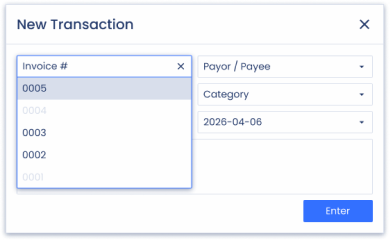
Fast Income Logging
Goals

  • Reduce friction
  • Minimize manual entry
  • Auto-calculate taxes
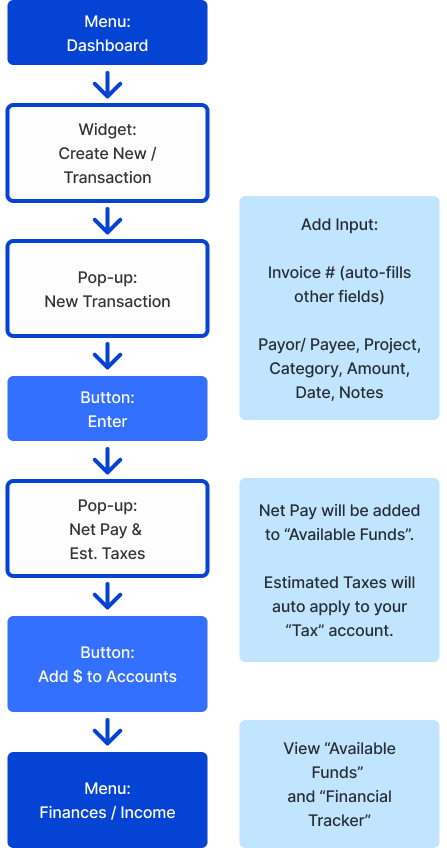
New Transaction Pop-up with dropdownNew Transaction Pop-upIncome Tracking Mobile Flow
New transaction flow

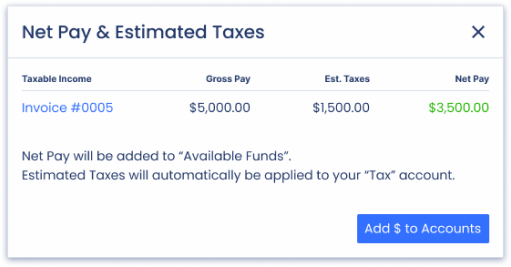
Net Pay & Estimated Taxes

Estimated Taxes

  • Self-Employment Tax (15.3%)
  • Federal Income Tax (10% - 37%)
  • State Income Tax (4.75% to 9.9%)
Net Pay & Estimated Taxes
Income screen

Tax Estimator

Removing Guesswork

Features

  • Real-time tax calculations
  • Quarterly estimates
  • Tax savings recommendations

Design Rationale

Tax information is traditionally intimidating. The experience was designed to feel approachable and actionable.
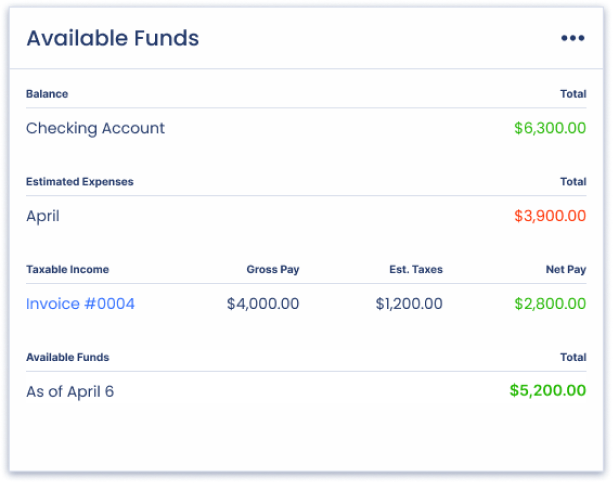
Available funds widget card

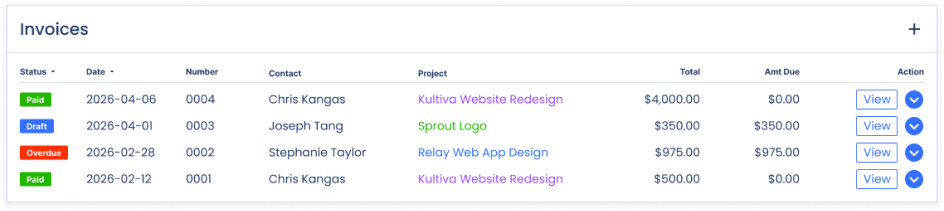
Invoice Management

States

  • Draft
  • Sent
  • Viewed
  • Paid
  • Overdue
Invoices Mobile ScreenAvail Invoice Management Mobile FlowInvoices Widget Card
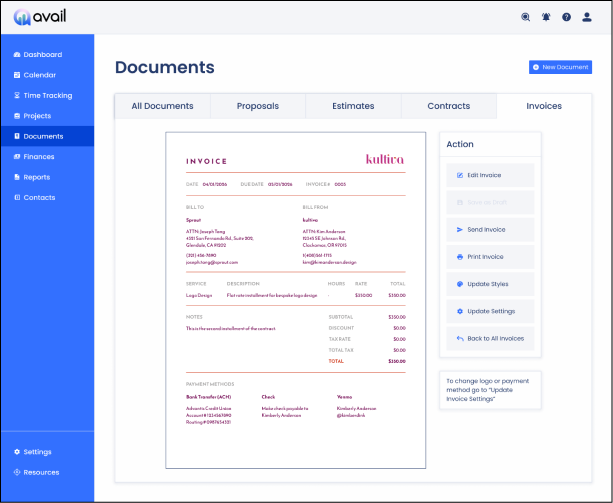
Avail Invoice Management Flow

Invoice Management

Edit invoiceView Invoice

Mobile Experience

Avail mobile experience

Reflection

Impact

Avail helped users:

  • ✓ Understand real spending power
  • ✓ Reduce Tax Uncertainty
  • ✓ Track Paid Invoices
  • ✓ Make more confident financial decisions

What I learned

  • Financial clarity is more valuable than financial data
  • Simplicity requires prioritization
  • The most important metric isn't always the most obvious one

Next Steps: Future Features

  • Bank integrations
  • Savings goals
  • Cash flow forecasting
  • Client profitability insights
Reflective orb
Logo  Wordmark & Tagline

Helping freelancers make confident financial decisions through a clearer understanding of their money.

View Project in Figma

Next Project

UniSight on Desktop
SaaS Product
UniSight
I prototyped an internal web tool for grocery stores using Figma in tandem with a small team of developers and the creative director. I was responsible for the interface design, user flow mapping, and the overall user experience. I ensured platform-wide consistency through documentation and UI elements. Outside of UniSight web I also worked on a point of sale system named GrowPOS and an app named oneStore.
UI Design
UX Design
User Flows
Figma
View Case Study
Link icon

Let’s Work Together!

I'm always interested in hearing about new projects and opportunities. Let's create something great together.